Wednesday, March 14, 2018

Difference of Constant And Readonly


It is a common interview question what is the difference between constant and readonly and most of the candidates can’t answer this question. Actually our problem is we just see the things and search the code and just paste it into our program and we don’t even know how it works? Why we are using it?
When you people focus on What, Why and how then you’ll be successful in your career. Let’s try to understand the difference between const and readonly
Here we’ve 2 types of constants in C#. Both of them helps you to define the constant in your application.
  • ·        Compile Time Constant
  • ·        Runtime Constant
Now you might be worry about actually what is compile time and runtime.


Look when we build our program it is the compile time and when the application runs it is the runtime.

Differences
  • We initialize the const field at the declaration. And we can initialize the readonly field at the declaration and in the constructor as well when we are going to use but when the readonly and const variable are set then they can’t be changed into the complete program.
 class Program  
 {  
   private const double PI1 = 3.14;  
   private readonly double PI2 = 3.1;  
   private readonly double PI3;  
   public Program()  
   {  
     PI3 = 3.2;  
   }  
   static void Main(string[] args)  
   {  
   }  
 }  

  • We use the const when the value is absolutely constant like we know 1m has 100cm and it can never be change. But we use the readonly when the value depends upon the user like PI value can be 3.1 or 3.14. So it is not absolutely constant.
  • const is static by default but readonly is not static by default we need to manually make it static if we want.

 namespace HelloWorld  
 {  
   class Vehicle  
   {  
     public const int NmbrOfTyres = 4;  
     public readonly string Name;  
     public Vehicle()  
     {  
       Name = "BMW";  
     }  
   }  
   class Program  
   {  
     static void Main(string[] args)  
     {  
       Console.WriteLine(Vehicle.NmbrOfTyres);  
       Vehicle vehicle = new Vehicle();  
       Console.WriteLine(vehicle.Name);  
       Console.ReadLine();  
     }  
   }  
 }  

We can also create the class instance and set the readonly value conditionally.
 namespace HelloWorld  
 {  
   class Vehicle  
   {  
     public const int NmbrOfTyres = 4;  
     public readonly string Name;  
     public Vehicle()  
     {  
       Name = "BMW";  
     }  
     public Vehicle(bool type)  
     {  
       Name = "Lamborgini";  
     }  
   }  
   class Program  
   {  
     static void Main(string[] args)  
     {  
       Console.WriteLine(Vehicle.NmbrOfTyres);  
       Vehicle vehicle = new Vehicle(true);  
       Console.WriteLine(vehicle.Name);  
       Console.ReadLine();  
     }  
   }  
 }  

  • if we want to make the readonly static then we need to treat it like we do with static members.
 namespace HelloWorld  
 {  
   class Vehicle  
   {  
     public static readonly string Name = "BMW";  
   }  
   class Program  
   {  
     static void Main(string[] args)  
     {  
       Console.WriteLine(Vehicle.Name);  
       Console.ReadLine();  
     }  
   }  
 }  

  • constants can be declared at function level. But readonly must declared at class level.·        
  • Constants values are stored in the program IL whereas readonly values occur at runtime so they doesn’t store in program IL.
    Build the program and Open the project through ILSpy.
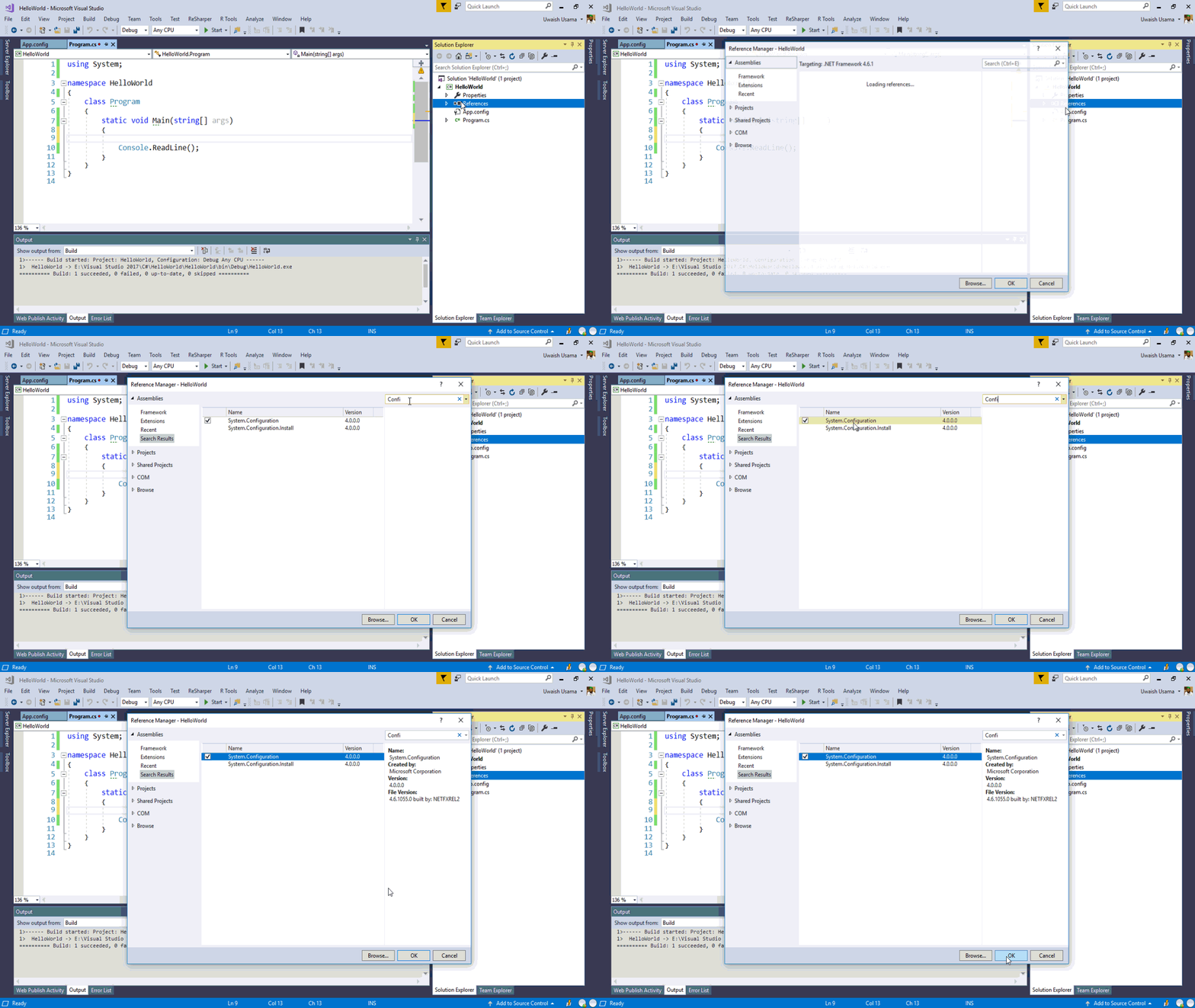
  • As we know readonly constant value depends upon the user. So we can set the value in app.config and access it in the program.
 <configuration>  
   <startup>   
     <supportedRuntime version="v4.0" sku=".NETFramework,Version=v4.6.1" />  
   </startup>  
  <appSettings>  
   <add key="price" value="25"/>  
  </appSettings>  
 </configuration>  

But for this you need to add the reference into your program of ‘System.Configuration’


 class Program  
 {  
   private readonly int _price;  
   public Program()  
   {  
     _price = Convert.ToInt32(ConfigurationManager.AppSettings["price"]);  
     Console.WriteLine("Total price is: " + _price);  
   }  
   static void Main(string[] args)  
   {  
     Program program = new Program();  
     Console.ReadLine();  
   }  
 }  
Note
Keep in your mind, once you initialize the readonly variable you can’t change its value later even during the execution of your program. And you know about const already that it limits you at compile time as well.

Tuesday, March 13, 2018

Variable Constant And Naming Conventions

Variable
It is actually impossible to become a perfect developer without knowing about the basics of programming. And the most basic thing of any programming language is to use the variables, constants and its datatypes. Variable is actually the mathematical term but in programming we don’t use variable as we do in mathematics. In programming world, there we’ve some limitations to use the variables about its declaration, definition. Variable is actually a container in which we store the values. Variables, Constants, Methods, Interface, Class, Namespace these are the things we say Identifiers. Programmers name the identifiers their own and use them in the program.
Variables are declared with the help of datatypes. We’ve 2 terms

  • ·        Variable Declaration
  • ·        Variable Definition

Variable Declaration in which we just declare the variable using datatypes. But in our mostly development environments when we declare the variable it becomes automatically define into the memory like

 int x;  

Now in C#, it will automatically assigned with 0. Here we just declare the variable but it becomes defined automatically.
Variable Defintion we declare the variable and initialize it with the value. This is what we call variable definition.

 int x = 1;  

Each variable has its own datatype and this type is used to allocate the space for that variable into the memory, it also helps with its different function that we can apply on that type to manipulate different operations. We should use meaningful names for identifiers because this is the best programming approach.

 int x, int y;               // (really poor approach)  

Because if you name your identifiers properly then it would be helpful to understand the program for the other developer as well later on. We can’t name the variable which names are fixed in C# language. If you want to declare the variable in this way, then you need to use ( _ , @ ) these signs to declare the variable.

 int @int = 5;  
 int _int = 3;  

Variables are mutable (that can be changed) we can change the variable values in our application.

Strongly Typed
C# is the strongly typed programming language. It means that if we declare the variable for the specific type (int, float, long) then we can’t change the type of this variable later. But it is possible that we make another variable and cast the value of 1st variable into the 2nd variable, but it will be something lossy value conversion.

Constants
Constants are the variables that can’t be changed throughout running the application. Constants are Immutable (that can’t be changed). We use the constants when we need a specific value throughout the application like we initialize the constant and assign it file path, now we just use this constant in our entire application.

 const int distance = 500;  

When we declare the constant variable, we need to initialize at that time as well. Because on constant variable creation, program sets its value. And in later, we can’t change its value.

Naming Convention
It is quite difficult to name the meaningful names to the identifiers. Anyhow let’s discuss naming convention. Listen if you want to look like a good developer in the market then you must use the meaningful names and use the naming convention approaches in the programming.
Camel Case Notation
This notation is very common, we normally use this notation to name our variables and method arguments. In camel case notation, just 1st letter is lowercase and then each letter of the next word will be in uppercase e.g.
 string firstName;  
Pascal Notation
Pascal Notation is used when we name the class and methods. In pascal notation, each letter of each word is capital e.g.
 public class VehicleCategory {}  

Conclusion
Variables are open to change and constant values can’t change in the program.

Monday, March 12, 2018

C# First Program


It is the better place to get started with C# application development. Here we’ll use the Console application to explore the C# concepts. Console is actually nothing but the command prompt (or DOS Prompt) of Windows OS. It doesn’t have any GUI (Graphical User Interface)

  • ·        First of all, create the new project.


  • ·     Now create the ‘.Net Framework Console Application’
  • ·        Now we’ve successfully created our Project in C#.
  • ·        Let’s discuss the namespaces which are included in our project by default.             System
         This namespace is used for the general purpose operations, mathematical               computations and even it is also helpful to generate the random numbers. It is       also helpful for the Garbage Collection and exception handling.
         System.Collection.Generic
         This namespace deals with the collections or containers. With the help of this         namespace we can create any type of collection.
         System.Linq
         It is used to work with data. We can filter our data and manipulate different           kind of operations with the help of linq.
         System.Text
         It is used in working with Text, Encoding features and stuff like that.
         System.Threading Tasks
         It is used to build the multi-threaded applications.
As we already know that C# is actually case sensitive. So the Main() method spellings should be capitalize otherwise CLR doesn’t find any entry point of your application.
string[] args are actually command line arguments, we actually use these command line arguments on the start of application. We give data to our application just on the beginning.
  • ·        Right Click on your Project in Solution Explorer and Open the Properties of your project.
  • ·        And input some values here.
  • ·        Now write some code into the Main() and apply the breakpoint at the start of the function.

Friday, February 2, 2018

Application Architecture


Before start our journey with C#, let’s discuss the architecture of an application in .Net Framework. As we already know that there is a pretty good rule of Separation of Concern (SOC) in Software Engineering, it helps us to classify different modules and different sections with respect to their working separately and then we can use this module of code in our program where we want.
Similarly, in .Net Base Class Libraries to support different types of functions for a specific purpose like application connectivity with database, data filtration, to print something on the console there are different classes in different namespaces.

Why we create the Namespaces?
As we already know that we can’t create two variables of the same name inside of same block of code. Similarly we can’t make any class, any identifier with same name in its own scope. So we take help of namespaces.
Namespace is just like a block in which we define our classes. And we can access those classes with this specific namespace name. If the same name of class is also define somewhere else in any other namespace. Then it will make no effect on our application because its namespace block name is changed. So when we are writing code in Visual Studio, then sometimes our IDE asks from us this method or this class is from using statement and then we should know about those using statements, actually which we need to include in our program which is relevant to our classes or methods which we are using.
When we make a project then we create a custom namespace with the same name of our project.


What is Assembly?
Microsoft Official Documentation says that
“Assembly is the fundamental unit of Deployment”.
But this definition doesn’t clear us the concept of an assembly.
Let’s discuss what is an assembly? It is actually the precompiled code which can be executed by the CLR. The using statements which we use in our programs are actually precompiled chunks of code, these are the namespaces.
Basically assemblies are used for the Reusability purpose, when we add the class library in our project and add some methods in it and build that project it will create the assembly in (.dll extension). DLL stands for dynamic linked libraries, it has not its own memory space for deployment. We make some common code in our class libraries and generate its assembly and we can use it in our any framework like ASP.NET, WPF, UWP, ADO.NET etc.
When we create the program then we can see some using statements appear in our files these are actually the assemblies which provides us the classes or methods relevant to the nature of our project/application.

Open your Object Browser, 'mscorlib' is an assembly and {} shows the namespaces of the relevant assembly.
Here 'Console' is the class of 'System' namespace and it has following methods.

How Can We Create a Proper Meaningful Assembly?
Make the Project and add some functionalities to it. Then build it and now open the location of this project
Bin/Debug/…
Here you’ll see its assembly.
Now if you wanna consume it in your different project then you need to add reference to this compiled assembly.

Example
      1)    Create the Console Application.
      2)    Add Class Library Project in the Solution.
      3)    Add this Code to Your Class Library Project.
 using System;  
 namespace AssemblyDLL  
 {  
   public class Class1  
   {  
     public void PrintBismillah()  
     {  
       Console.WriteLine("In The Name of ALLAH Almighty");  
     }  
   }  
 }  
     4)  Now Build this Class Library Project and Reference its Dll to our Console Project.
      5)    And now add this code in console project ‘Program.cs’.
 using AssemblyDLL;  
 using System;  
 namespace AssemblyDemo  
 {  
   class Program  
   {  
     static void Main(string[] args)  
     {  
       Class1 obj = new Class1();  
       obj.PrintBismillah();  
       Console.WriteLine("Salam");  
       Console.ReadLine();  
     }  
   }  
 }  

     6)    Run the project
Here you’ve observed that the code which we’ve written in our Class library (.dll) is executing in console project memory space. Similarly we can use this precompiled dll in any framework where we need this common functionality.
Now understand this concept at little bit enterprise level, actually the thing is we make a module of specific tasks in which we use our relevant assemblies which support our code. Then we build it. And now this new created assembly which is in the form of (.dll) we can use it in our project.

Remember Assemblies has many types of extensions but here we have just two types of assemblies
  • ·        .exe
  • ·        .dll

Wednesday, January 31, 2018

What is CLR and How it Works?


.Net Framework is the most popular platform among Developers because it is more efficient than any other platform or any other programming language. C# is the most popular and widely used programming language in the world. We can build any kind of application with the help of C#. But sometimes programmers become worry about the things under the hood they become worry about how the things work. So here we’ll discuss the things which helps us and makes the things ready for us.
.Net Framework has two Major Components

  • ·        CLR (Common Language Runtime)
  • ·        .Net Base Class Libraries

These are the two major things which plays an important role in the development of any .Net Application.


CLR Big Picture

CLR is actually an execution engine of .Net Framework. It plays its role in .Net Application and Operating System. It makes some important configurations (settings) to deploy the application on Operating System. CLR is an application which is sitting under the hood and it is actually the heart of .Net Framework. It helps in the program to locate, load and manage the .Net objects. Actually it also takes care of program memory management, exception handling, application hosting and for the security checks. It has some major goals

  • ·        IL Code To Native Code
  • ·        Garbage Collection

Here we’ve something detailed picture about .Net Framework and here we have many different blocks available for different purposes but we just need to know the major things and it is not so much beneficial to know all the things. So let’s start our journey with CLR.


CLR is actually an execution engine of .Net Framework. It makes some important configurations (settings) to deploy the application on Operating System. Microsoft CLR understands more than 132 languages.
Actually where we talk about CLR, we also discuss

  • ·        CLS (Common Language Specification)
  • ·        CTS (Common Type Specification)


Let’s suppose we have made a library in C# which we are using in Visual Basic Environment, then how they’ll understand each other. It would be possible all these defined rules which is under the CLR. CLR knows through CLS and CTS what the code has actual meanings.

CLS

As we already know that CLR supports many different programming languages in .Net Framework. And when we write code in any programming language, it has its own syntactical rules which we need to follow. And these rules can vary from different programming language. But CLR understands all these different rules of different programming languages with the help of CLS.

Example

  • ·        In C#, each statement ends with (;) semi-colon.
  • ·        In VB.Net, we should not end up our statement with semi-colon

Both languages is compiled by CLR, and CLR knows how to compile them because it already knows these different rules in these different environments.

CTS

Look each data type has different meanings, different size of container in different programming language. And CTS helps CLR to understand these different styles and make its own CLR defined data type.

Example

  • ·        In C#, we define the datatype

         int
         Now CTS understands it and make CLR
         Int32           (CLR datatype which means under the hood)

  • ·        In Visual Basic, we define the datatype in different style,

         Integer
        Now CTS also understand this way of datatype declaration and make the CLR             datatype
         Int32

IL Code To Native Code

As we already know that when the code is compile then there are few parameters of information as well the compilation need like (OS, Hardware, and Different Configurations). So when we compile the code completely from source code to machine code then it is completely ready to deploy. And it would be compatible just only for that machine. Sometimes it works like I compile my code on Windows 7 and try to run on Windows 8 then it would be run but it won’t be run optimally. It would not be run with its full performance.
Similarly if we wanna run our compiled code into any other OS then it becomes crash. Here we need the solution to this kind of Problem.
Microsoft introduces CLR in .Net Framework and here we have a feature of JIT (Just In Time) Compilation. The Purpose of this feature is we just compile our code with its compiler and compiler converts this code into byte code. Now the code has been compiled. But when we wanna deploy it on any targeted machine then JIT makes that byte code to machine code and includes the available information of that machine like (OS, Hardware, and different metadata information or configuration). This is the way JIT Component works.
And now we can run our code on any OS like Mac, Linux, and Ubuntu etc.

If we want to see the IL Code, then we’ve ILSpy which we can download from ‘Extension and Updates’ in Visual Studio.
  • ·        Tools > Extension And Updates
  • ·        And install ILSpy.
Here I’ve already installed it. So Green Tick Mark is showing.

Actually what is IL Code?

IL stands for Intermediate Language. It is actually partially compiled or half compiled code.

Example

  • ·        Make a Console Application and write some code.
 static void Main(string[] args)  
 {  
   int x = 123;  
   Console.WriteLine(x);  
   Console.ReadLine();  
 }  
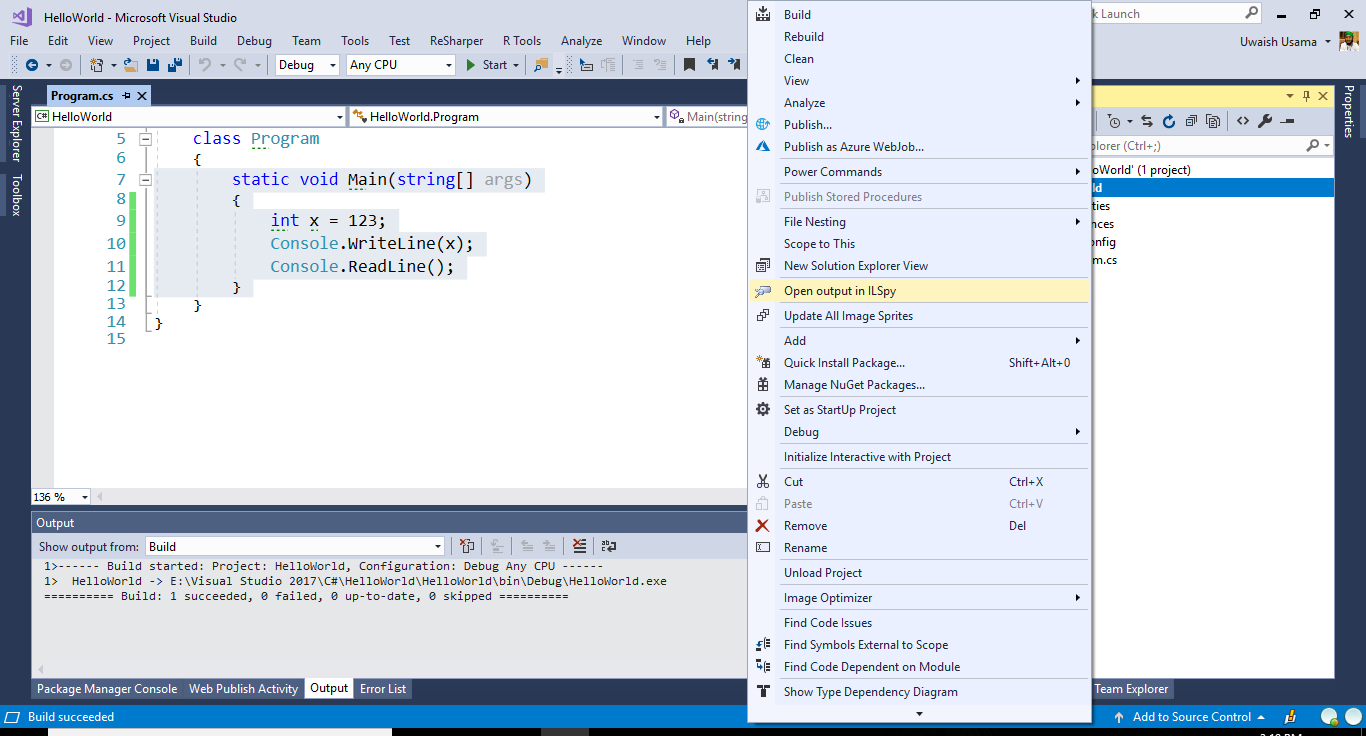
  • ·        Now build the project.
  • ·        Right click on the project and Select ‘Open Output in ILSpy’
  • ·    Now select ‘IL’ in ILSpy window and click on Program class in ‘Hello World’ ILSpy Project.
And Here You can see how your program IL Code looks like.

Note:

Keep in your mind, if you want to see the IL Code of your project then you need to build the project because IL of any program is generated by building the project.

How does JIT compile our code?

There are 3 ways to compile the code.
  • ·        Per File
  • ·        Per Method/Function
  • ·        Code Fragment

But we can’t force JIT about them. JIT will take the decision itself what is the strategy and how does it compile the code.

Garbage Collection

I suppose that you are already familiar with C++ Development Environment. In C++ we make the objects and they remain in the memory until the application finishes its execution. Another example is suppose we are allocating the memory at the runtime then we need to deallocate the memory as well otherwise our memory becomes reserved. Now we can’t use that memory any more whether you stop your program. We actually need to deallocate it at the runtime.
And these kind of things are so much costly for the program. If we measure the complexity of our program then we already know that to measure the complexity there are two major things.

  • ·        Time
  • ·        Space

If our application is playing with many unused objects then it is actually consuming huge space and time as well.
So here Garbage Collector comes into picture. Garbage Collector is the component of CLR which releases the unused managed objects even during the execution of the program. It doesn’t release the (unmanaged) objects which are outside of the CLR like COM objects (Excel, Word etc.) or the objects which are relevant too peripheral operations like (StreamReader, StreamWriter etc.), we need to manually dispose them in our program. And it has few techniques which we will discuss later in the series.
To release the memory at runtime, GC uses the technique of Generations.

Why GC Uses the Technique of Generations?

Because it is so much costly for the GC to analyze each object again and again and check that the object is releasable or not?
So GC uses the technique of Generations.

How Generations Work?

When we create an application then new created objects comes into Gen 0, then GC runs and analyze all the objects that do they need more in the application or not? If they are unused then GC release that objects from the memory and move those remaining objects into the Gen 1.
Still application is keep running and now again new objects being created and now they again analyze into Gen 0 and if they are not important for future they become release and if they are important then they move to the Gen 1. Now GC comes into Gen 1 and analyze the objects if they are important for the future then they move the objects into Gen 2 and if they are not important then GC release that objects from the memory.
And now the process keeps going same as it is.
It is so much difficult to release the objects from Gen 2 and Gen 1 family and it is quite easy to release the objects that are from Gen 0 family.

.Net Base Class Libraries

Now let’s discuss the concept of base class libraries. You might have already seen the header files including in C++ programs.
 #include<iostream.h>  
 #include<conio.h>  
These include files are actually its base libraries which supports our built-in functions keywords etc. If we not include these header files we can’t even write a single line.
Similarly, each language has its own header files, packages, libraries. In .Net Environment, we have Base Class Libraries/Framework Libraries.
Base Class Libraries has 2 types

  • ·        User Defined Libraries
  • ·        Pre-Defined Libraries

User Defined Library (Assembly)

In .Net Environment, user defined libraries (means that the program which is written by programmer or developer) are called assemblies. We use these custom assemblies which we build according to our requirement in different programs. Actually the concept of assembly is all about the reusability factor. That we make an assembly and use it in any our program where we want.
It has two types.
  • ·        .exe

       .exe (executable program), this is the execution file and it can run independently
  • ·        .dll

       .dll (dynamic linked library), it can’t run independently. We add dll file into another program either it is console application, winforms, wpf, web application. And we use this (dll file) here in this application.

Predefined Library (Namespace)

These libraries are actually framework defined, which have built already we just include them and use them.
Like in C# Program, we include the namespace
 using System;  
This is predefined library.